Promptomat Evolution: From Prototype to Production Workflow System
Five days ago, Promptomat was a two-hour prototype. Today, it's a production-ready workflow system with 6 default workflows, multi-step execution, customizable themes, and persistent history management.
What changed? Everything — and nothing.
The core idea remained simple: reduce friction when working with AI on complex tasks. But the implementation evolved dramatically once real usage revealed what mattered most.
The Pivot: From Templates to Workflows
The initial prototype focused on prompt templates — pre-written structures you could fill in and copy. It worked for simple cases, but fell apart quickly when tasks involved multiple steps or needed context-specific customization.
The real breakthrough came from shifting to generic workflows — reusable, multi-step processes that could be flavoured to fit different contexts rather than rigidly enforced.
Philosophy: Workflows should be customizable, not prescriptive. They guide without enforcing. They suggest without limiting.
This meant rethinking the entire architecture. Instead of static templates, workflows became dynamic recipes with configurable steps, inputs, and execution modes.
What Got Built
In just 5 days of iterative development, the tool gained production-ready features:
🔄 Generic Workflows
6 default workflows across 3 domain packs — reusable patterns for development, testing, and documentation tasks.
🎨 Flavour System
Customize workflow tone, detail level, and constraints without creating entirely new workflows.
📋 Multi-Step Execution
Break complex tasks into sequential steps with full context continuity.
📜 History Rail
Visual prompt history with animated spawning, one-click restoration, and persistent storage.
🔀 Mode Switching
Toggle between project-specific workflows and generic workflow browsing with clear visual state.
🎨 Theme Customization
Accent color control with randomization option and persistence. Color coding helps identify contexts.
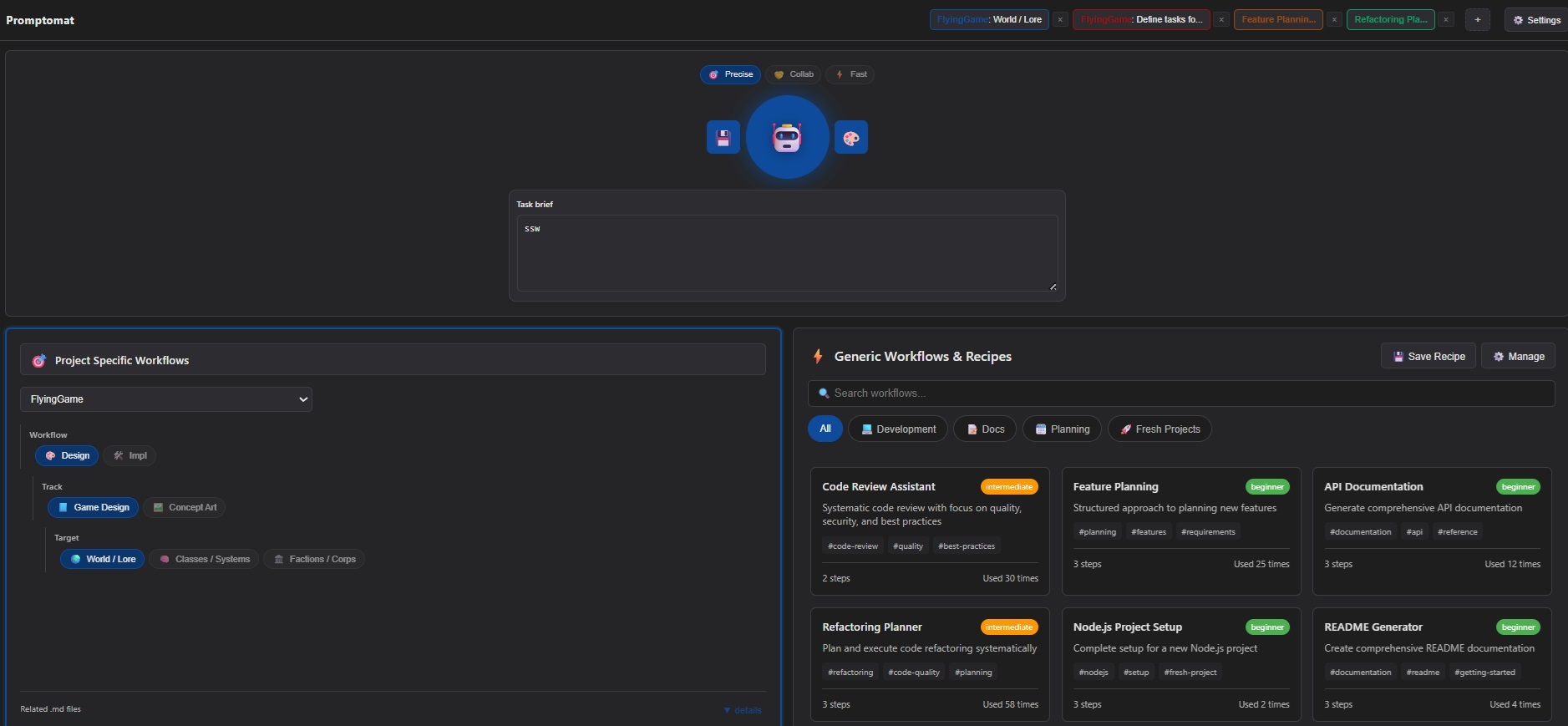 Current interface after UI rework: Split-panel workflow browsing with history rail, collapsible sections, and theme controls.
The History Rail Discovery
One unexpected feature emerged during development: the prompt history rail. Instead of losing previous prompts when generating new ones, they now animate into a right-aligned horizontal rail at the top of the interface.
Users can restore any previous prompt with one click, or return to their current work-in-progress via the + button. Theme colors persist with each entry, making visual identification effortless.
Key lesson: Flexbox row-reverse elegantly handles right-to-left growth without complex positioning.
Development Philosophy: "Grow with Tools"
A critical principle shaped development:
Tools should adapt to evolving AI capabilities, not prescribe rigid structures.
This meant:
- Guidance over enforcement — workflows suggest approaches rather than mandate steps
- Multiple flavours — different users (or AIs) prefer different styles
- Freedom for assistants — AI tools decide how to use workflows, not the other way around
- Customizable defaults — reasonable starting points that can be overridden
This philosophy prevented the tool from becoming rigid. As AI tools improve, workflows adapt without requiring rewrites.
Architecture Lessons
Building Promptomat reinforced several technical insights:
1. Service-Based Architecture Works
Separating workflowEngine.js and workflowStorage.js kept concerns clean. The UI layer (WorkflowPanel.js) never touches localStorage directly. This made adding features like history management trivial.
2. Persistent State Requires Planning
Three separate localStorage keys manage different concerns:
project-{name}-state— current working state per projectworkflow-history— global prompt historyworkflow-recipes— saved workflow configurations
Mixing them would have caused data collisions and made debugging harder.
3. Visual Feedback Matters
Mode switching needed more than just state changes — it required visual clarity. Active panels highlight; inactive panels mute. Users never wonder which mode they're in.
4. Collapsible Sections Save Space
Workflow details, file lists, and pack configurations collapse by default. Power users expand them; casual users ignore them. Everyone gets the interface they need.
What Didn't Make It (Yet)
Several features remain on the roadmap:
- Pack Hierarchy UI — expand/collapse workflow packs visually instead of flat lists
- Advanced Recipe Management — sharing and importing saved workflows
- Analytics Dashboard — track workflow usage patterns over time
- Contract-Based Development Workflow — codifying the 4-phase planning process as a workflow pack
These weren't cut due to complexity — they were deferred because the core system needed to stabilize first. Building these features on a shaky foundation would have made everything brittle.
The Working Contract
Development followed a 4-phase contract:
- Planning — define goals, tasks, and acceptance criteria
- Implementation — build incrementally with frequent commits
- Verification — test against acceptance criteria
- Documentation — update plans and document completion
This cycle repeated for every feature. It prevented scope creep and kept progress measurable. Interestingly, this contract itself will become a Promptomat workflow pack in the next development phase.
Real Impact
Promptomat now drives its own development. Meta-workflows stored in /workflows/ guide feature planning, commit message formatting, and extension planning.
The tool became recursive: Promptomat helps build Promptomat.
This validates the core thesis: good workflow tooling accelerates complex projects. When structured correctly, the overhead disappears and only velocity remains.
Why So Many Experiments?
Promptomat is one of many tools and experiments documented on this blog. StockTool, Asset Viewer, ModelEditor — each serves a purpose, but together they serve a larger goal: finding patterns that work.
Every experiment tests assumptions:
- Can zero-install tools compete with full applications?
- Do visual hierarchies improve complex data understanding?
- How much can vanilla web tech accomplish before frameworks become necessary?
- What workflow structures actually reduce friction versus creating more overhead?
Promptomat became different. It's not just an experiment — it's the platform for experiments.
The Iteration Laboratory
Promptomat's real purpose emerged during development: it's a place to bring workflows together, test them, find patterns, and improve systematically.
Instead of scattered notes and ad-hoc prompts, workflows now live in a structured system where they can be:
- Compared against each other
- Tested in real use cases
- Refined based on actual performance
- Shared across projects
- Version-controlled alongside code
This creates a feedback loop: use workflows → observe what fails → refine workflows → use improved workflows. Each iteration builds on lessons learned.
The generic workflow system makes this practical. A workflow created for Promptomat development can be adapted for blog posts, game development, or any other project. The patterns transfer; the specifics customize.
The Planning System Breakthrough
The most significant discovery was how sophisticated feature planning enables bigger changes in a controlled way.
Traditional rapid prototyping often means:
- Build quickly, document later (or never)
- Lose track of what changed and why
- Struggle to validate if features actually work
- Context sprawl when working with AI
The WORKING-CONTRACT.md system flipped this. Every feature follows four phases: Plan → Implement → Verify → Document. Each phase has clear inputs, outputs, and validation criteria.
The AI Performance Impact
This structure had an unexpected benefit: massive improvements in AI collaboration efficiency.
Before the contract system:
- Features required multiple back-and-forth clarifications
- Context reloading ate through token budgets
- Validation was ad-hoc and often incomplete
- Large features felt risky and hard to control
After implementing structured planning:
- Features ship with clear acceptance criteria upfront
- AI assistants know exactly what "done" means
- Context stays focused on the active phase
- Changes are incremental and easy to validate
- Rollbacks are surgical rather than catastrophic
The history rail feature, for example, involved UI changes and storage modifications. Without the planning system, this would have required constant context rebuilding. With it? Single focused session, clear validation, first-try success.
Context Management at Scale
Structured workflows dramatically reduce context waste. Instead of explaining the entire project every time, workflows provide:
- Scoped context — only what's relevant to the current task
- Consistent structure — AI assistants learn the patterns quickly
- Clear boundaries — what's in scope vs. deferred
- Validation checkpoints — catch issues before they compound
This means more features implemented per token spent, faster iteration cycles, and fewer "oops, that broke everything" moments.
Lessons from Building a Tool for Building Tools
Using Promptomat to build Promptomat revealed insights that wouldn't emerge otherwise:
- Dogfooding surfaces pain points fast — when your workflow tool slows you down, you fix it immediately
- Recursive systems compound benefits — each improvement to Promptomat makes improving Promptomat easier
- Documentation as development artifact works — workflows aren't just guides, they're living specifications
- Constraints breed creativity — keeping everything lightweight forced better architectural decisions
- Experiments inform production — patterns from small tools scale to larger systems
The structure that enabled rapid feature development wasn't planned from the start — it emerged from using imperfect systems and refining them.
Takeaways
- Prototypes reveal core ideas; real usage reveals actual requirements
- Flexibility beats prescriptiveness when designing workflows for AI collaboration
- Visual feedback improves feature discoverability dramatically
- Service-based architecture pays dividends when features compound
- Documentation-as-you-go creates valuable timelines without additional effort
- Tools that help build themselves prove their value immediately
- Structured planning enables rapid development at scale — clear phases prevent context sprawl
- Workflow systems benefit from iteration — comparing patterns across projects reveals what works
- AI performance scales with structure — better organization means more output per token
- Experiments compound — each small tool teaches lessons that transfer to larger systems
Next Steps
Promptomat's core is production-ready. The next phase focuses on:
- Recipe save/load finalization (already implemented, awaiting testing)
- Pack hierarchy UI for better visual organization
- Contract-based development workflow pack
- Usage analytics and history insights
But more importantly: building with it. The true test of a workflow tool isn't features — it's whether people use it daily without thinking about it.
That bar is now cleared.